

The top 5 compared
-
1
 Top pick
MadWords
- Writes and translates in 119 languages
- Bulk writes from up to 100,000 keywords
- Free plan with 10,000 words
27/27 features -
2

Surfer
- Articles in 18 languages
- Content Editor with live Content Score
- 7-day money-back guarantee (first-time subscribers)
14/27 features -
3

KoalaWriter
- Bulk mode writes from keyword lists
- One-click WordPress, Shopify, Webflow publishing
- Free plan with 5,000 words
11/27 features -
4

Frase
- Writes in 70+ languages and locales
- SEO and GEO scores per page
- 7-day free trial, no card required
10/27 features -
5

Autoblogging.ai
- Bulk batches of up to 500 titles
- Four AI images per article
- Articles in 38 languages
10/27 features
MadWords is an AI writer built for one job: researching, writing and publishing SEO articles to WordPress, then keeping them current. It also translates your posts into 95 languages for 138 countries, finds the keywords your competitors rank for that you don’t, and refreshes old posts on a schedule.
This is a review of our own product, so weigh it that way. It walks through every feature, screen by screen, with what each one does, what it costs in words, and where its limits are. It’s long because the product does a lot. If you only want the short version, read the verdict below and skip to pricing.
MadWords at a glance
| What it is | An AI SEO writer, translator and content refresher for WordPress |
| Made by | ZookaWare LLC, in SEO and SaaS since 2004 |
| Price | From $49 a month billed yearly, or $59 month to month |
| Free plan | 10,000 words and 250 keywords, no credit card |
| Languages | 95 languages, 138 countries |
| Publishes to | WordPress, live, as drafts or on a schedule. Or keep articles in MadWords and export them. |
| Guarantee | No Edit Guarantee, plus 30 day money back on unused words |
| Users | Unlimited on every plan |
The short verdict
What we like:
- Every feature is on every plan. Plans only differ in words, keywords and how many websites you can use.
- Every article is researched from the live Google results seconds before it’s written, not from a model’s frozen training data.
- 14.5 million article structures, so a batch of 500 articles doesn’t come out in one shape.
- No SEO score, no GEO score and no tone settings to write to.
- Keyword Gaps pulls every keyword a competitor wrote about and removes the ones you’ve already covered.
- Words never expire, and there’s no charge per seat.
- A No Edit Guarantee: if an article needs editing, you report it and get the words back.
What to know before you buy:
- AI detectors like GPTZero will flag MadWords articles as AI. MadWords says so on its own site. If you need to pass AI detection, this isn’t your tool.
- The keyword tool finds keywords from competitor sites. It doesn’t show search volume or difficulty.
- Translate, Refresh and Rewrite work on WordPress posts, so they need a WordPress site.
- Translation quality is best in the most widely used languages, roughly the top thirty. It gets more variable after that.
- It’s a new product, so there aren’t many independent reviews yet.
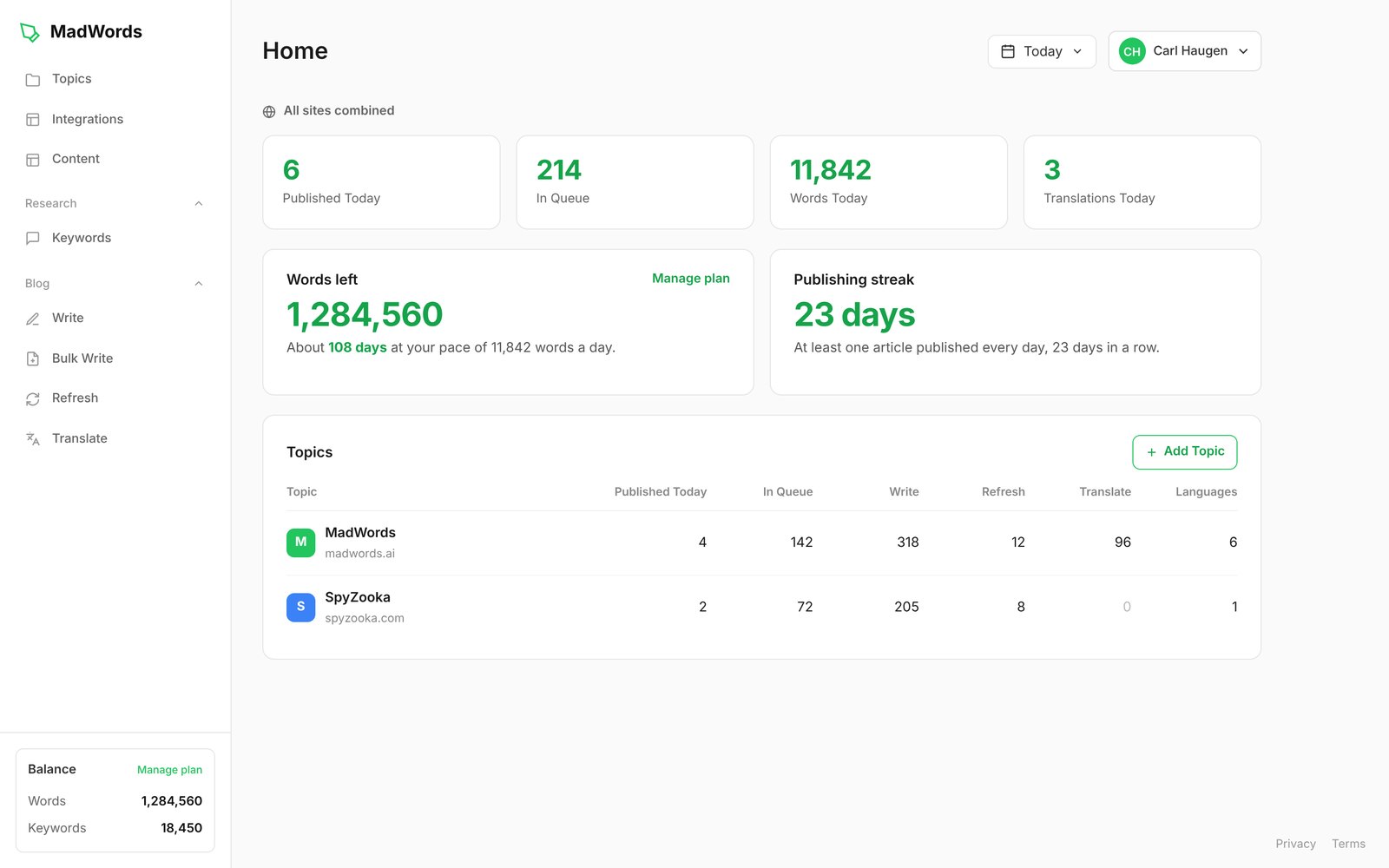
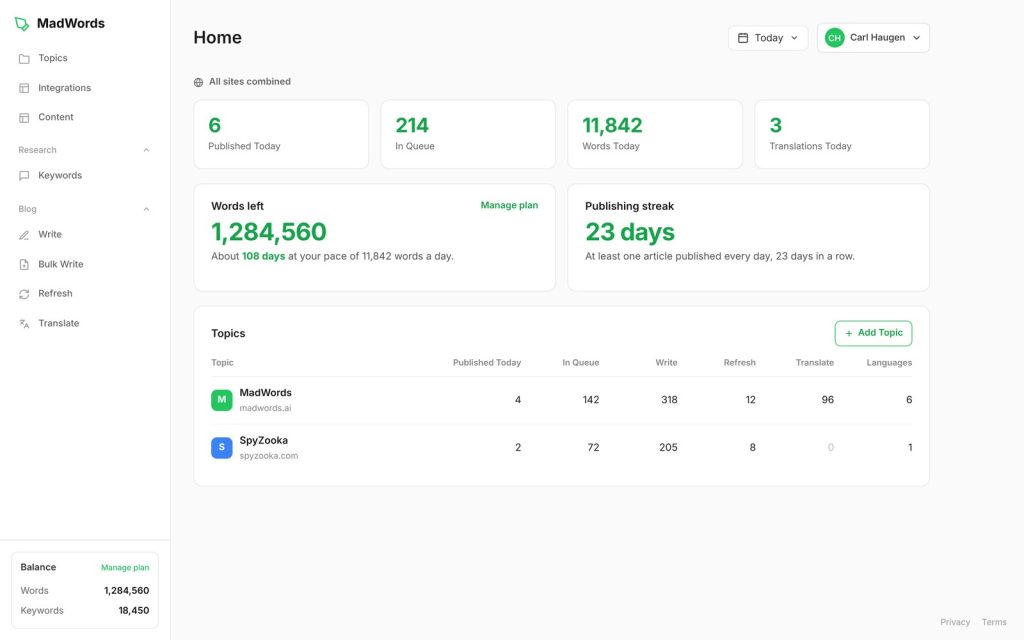
How MadWords is organized: Topics and projects
Everything in MadWords hangs off two ideas: Topics and projects.
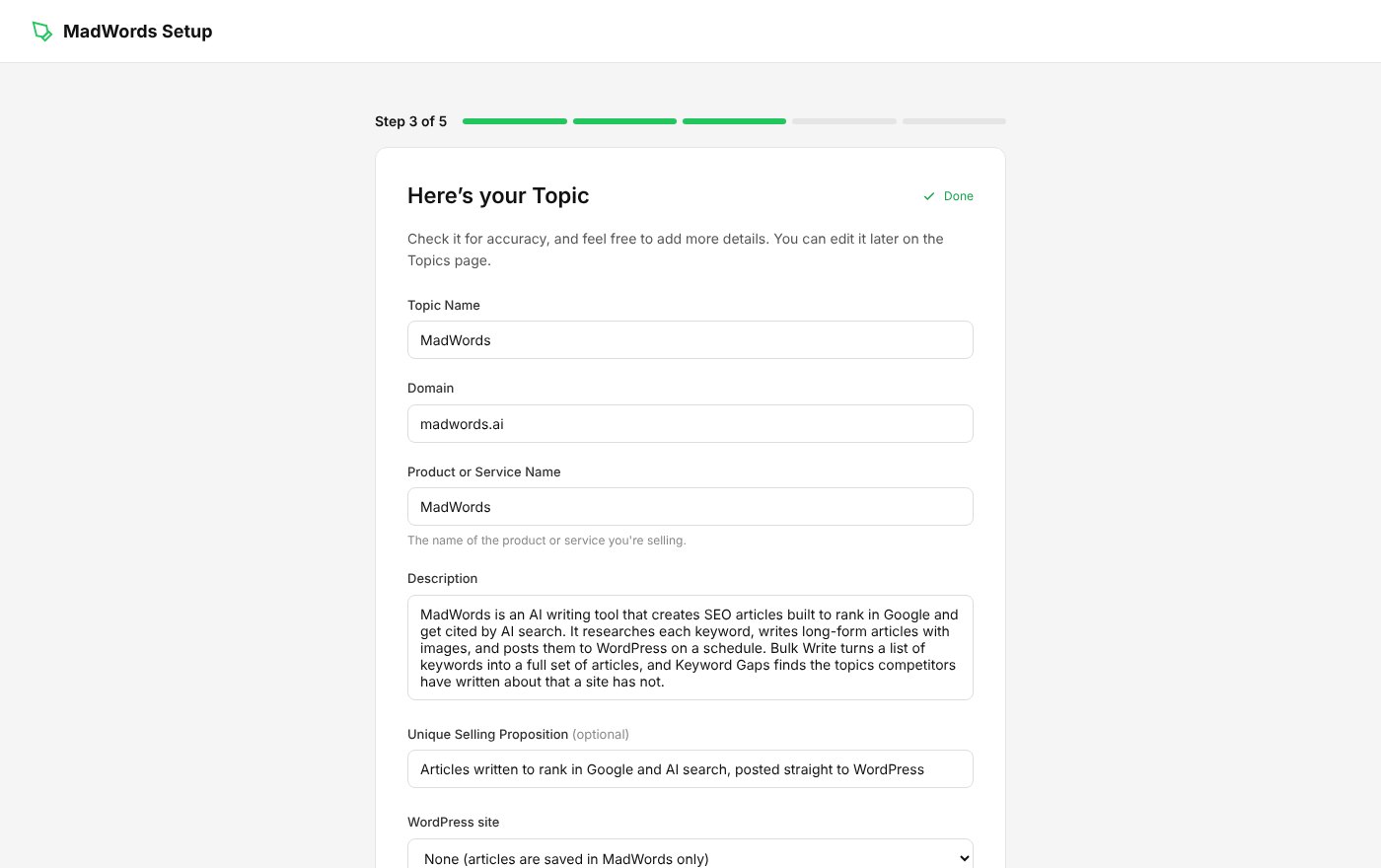
A Topic is a product, a niche or a subject. It holds the name, the domain, a description of the business, the product or service name, what makes it different (the unique selling proposition), and the WordPress connection. You set a Topic up once and every article you write for it knows your business. A Topic is not a website. If one site covers six subjects, you’d make six Topics, because each one needs its own description and products. There’s no limit on Topics.
A project is a job: a Bulk Write batch, a translation run or a Refresh schedule. Projects take under a minute to set up, because the Topic already holds everything about your business.
When you set up a Topic, MadWords reads your site and writes the description for you. You check it, add anything it missed, and save. MadWords recommends adding product names, prices, real numbers, your location and service area, and the problems you solve. The description has more effect on the articles than any other field, and it’s the difference between an article about your business and a generic one.
Connecting WordPress uses an Application Password, not your login password. You make one in WordPress under Users, Profile, Application Passwords, paste it in with your site address and username, and click Test Connection. You can revoke it at any time. If you don’t use WordPress, pick MadWords Only and your articles are saved in your account, where you can edit and export them.
Keywords and Keyword Gaps
The keyword tool is built around one question: what has your competitor written about that you haven’t?
You enter a competitor’s website. MadWords scans it and pulls the keyword from every blog post, using the slug, the title and the headline. Enter your own site too and it removes every keyword you’ve already covered, leaving a list of fresh topics. MadWords calls this Keyword Gaps.
A scan usually finishes in a couple of minutes, and a very large site can take five or more. You can filter by length, sort the list, and pull out the long-tail keywords of three words or more, which are easier to rank for on a newer site. Then you tick the keywords you want and send them straight to Bulk Write.
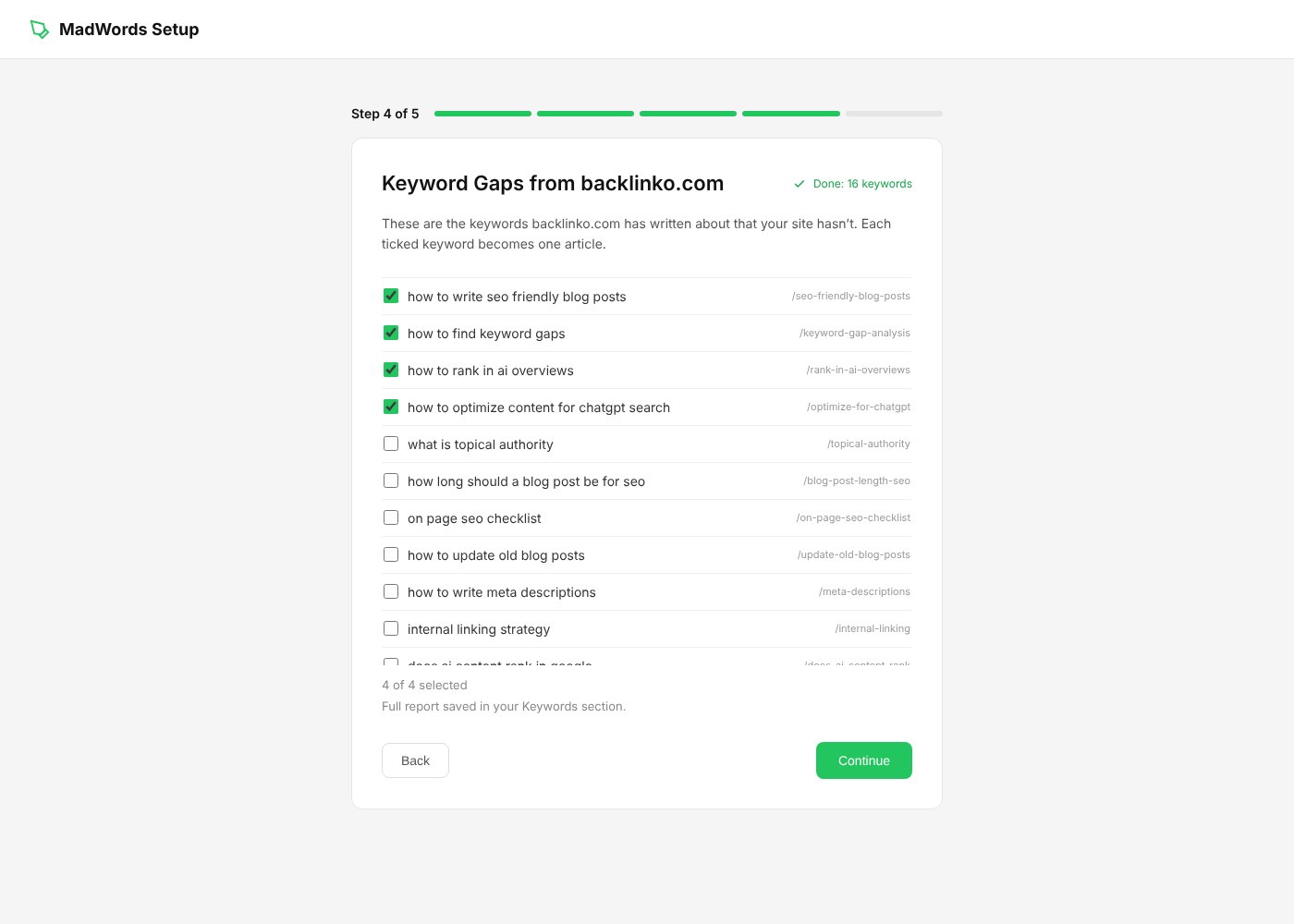
The idea behind it is topical authority. Google rewards sites that cover a subject completely, and the easiest way to cover more than a competitor is to start from their list. Every plan includes keywords: the free plan comes with 250, and each extra keyword costs 5 words.
The limit to know: this isn’t a search volume tool. There are no volume or difficulty numbers, and you can’t type in a keyword and see related ones. If you already have a keyword list, you can paste it straight into Bulk Write and skip this step.
Bulk Write
Bulk Write is the main event. You paste a list of keywords, or point it at an RSS feed, and MadWords researches and writes an article for each one, then posts them to WordPress on the schedule you set.
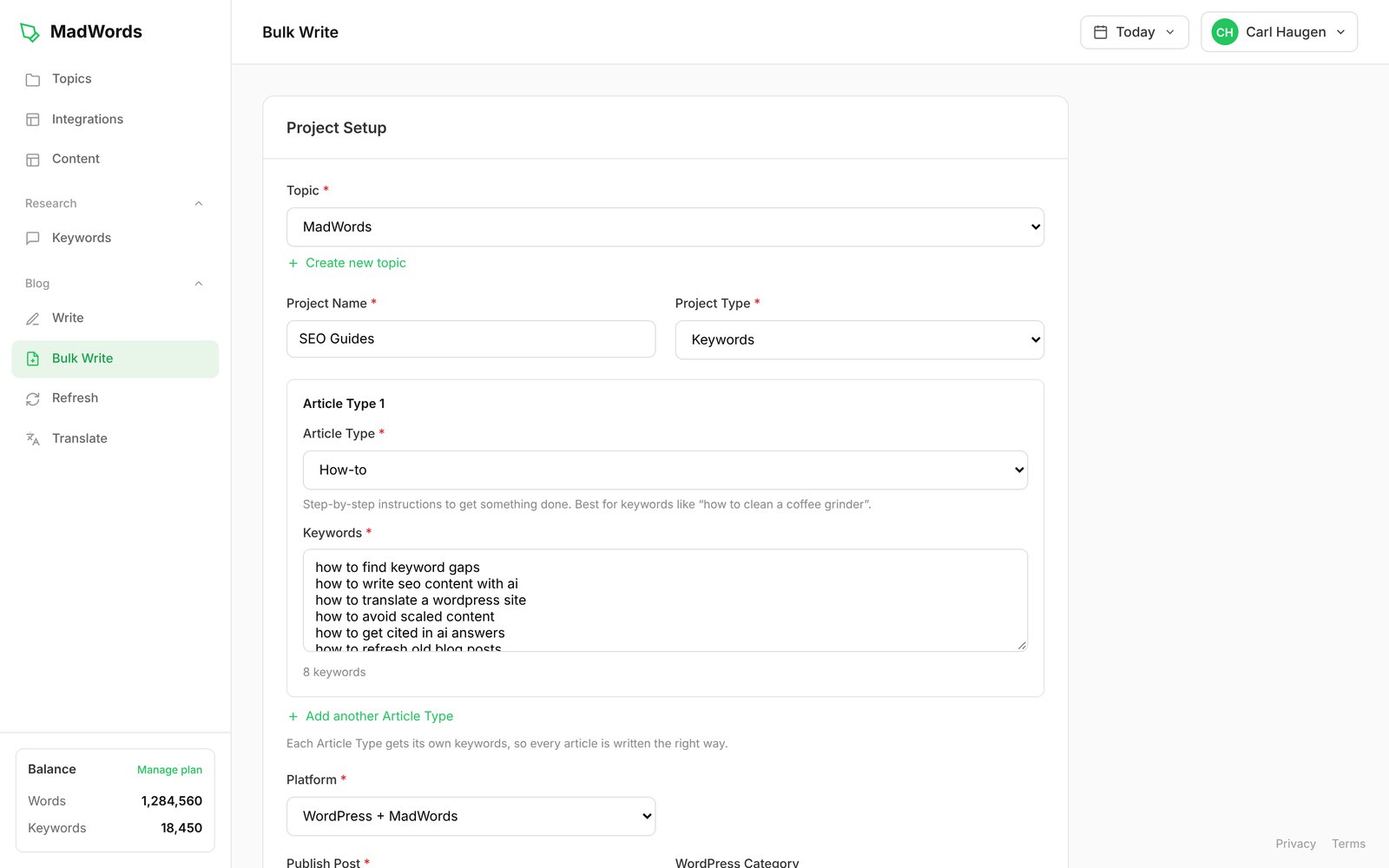
Here’s what you set:
- Topic and project name. The Topic brings your business details. The project name is a label for the batch.
- Project type. Keywords, up to 100,000 in one project, or an RSS feed.
- Article types. Sort your keywords into groups, such as reviews, listicles and how-tos, and each group is written in the structure that fits it. The types are How-to, Fix/Troubleshooting, Review, Comparison, Listicle, Explainer, News and Local.
- Products. Name up to 5 products and MadWords researches each one before it writes. More on this below.
- Images. A minimum and maximum number per article and an image style. Each article gets a random number between the two, so no two look the same.
- Publishing. WordPress plus MadWords, or MadWords only. For WordPress you pick the category and whether articles arrive as drafts or go live.
- Posts frequency. How many articles are written and published each day, or Immediately to write the whole batch now.
Before you start, Bulk Write shows the estimated words the batch will use, so you know what it costs before you commit. Articles are written when they’re scheduled. If you load 500 keywords at 2 a day, MadWords writes 2 a day, not all 500 up front, and each one usually finishes in under two minutes.
Write: one article at a time
Write is for articles you want a hand in, such as a cornerstone page, a product review or a post you want to rewrite. It has three modes, Write with AI, Editor and Rewrite, and all three use the same research as Bulk Write.
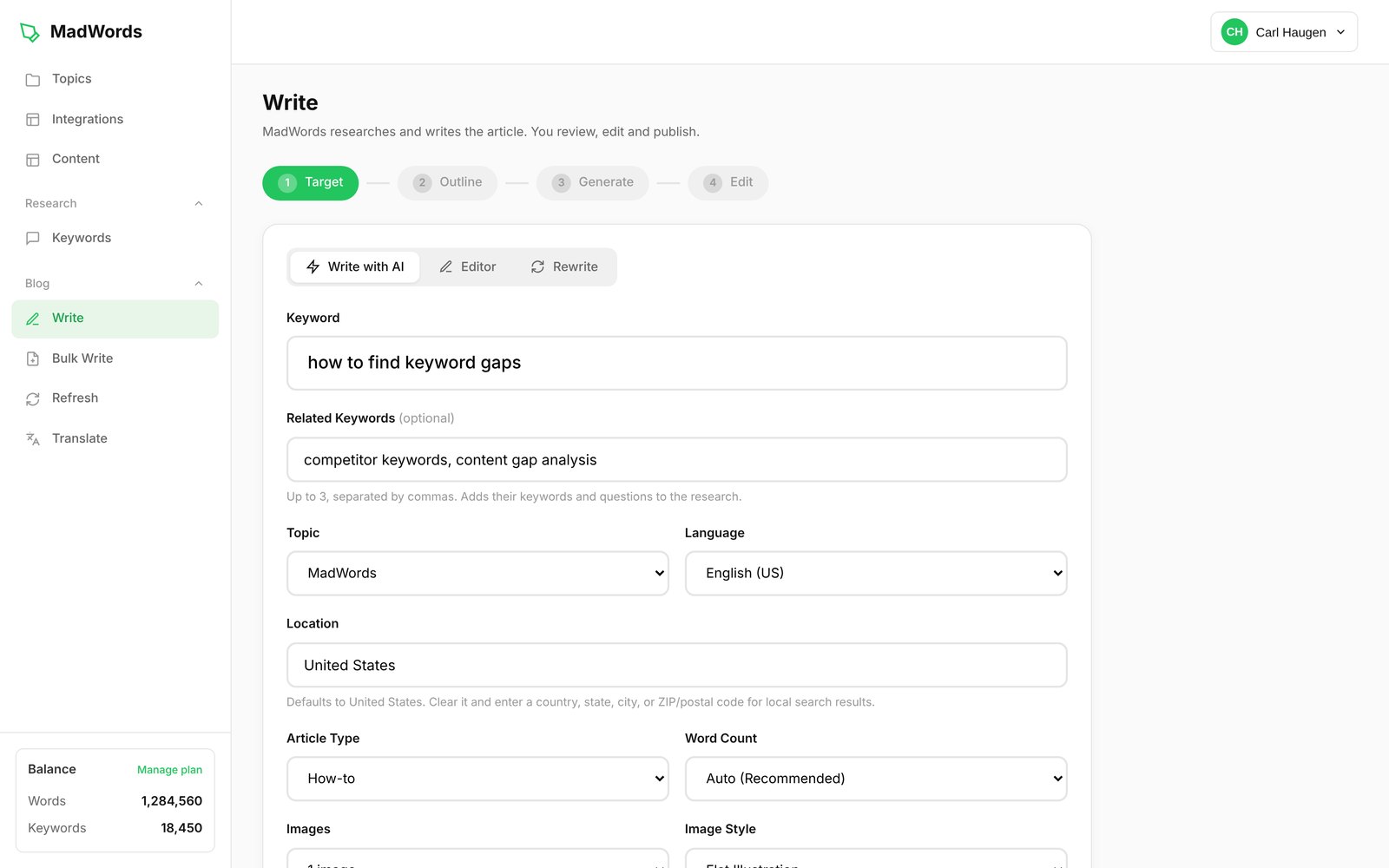
The setup fields:
- Keyword, the search you want to rank for.
- Related keywords, up to 3. Their keywords and questions are added to the research.
- Topic, so the article knows your business. Leave it on None for a standalone article.
- Language and location. Location decides whose Google results are researched. It can be a country, a state, a city or a ZIP code, which is what makes local articles local.
- Article type and word count. Word count can be set or left on Auto.
- Images, at 200 words each, with a style and your own direction for the scene.
- Products, up to 5.
- Exclusions and a prompt: brands or products the article must never mention, and any extra instructions.
You see the plan before it writes
This is the part we like most. Before MadWords writes a word, it shows you the plan: the 3 Google results it will write from, and the outline. You can untick a result that doesn’t fit, add up to 2 of your own pages as sources, and change the outline. Then it writes.
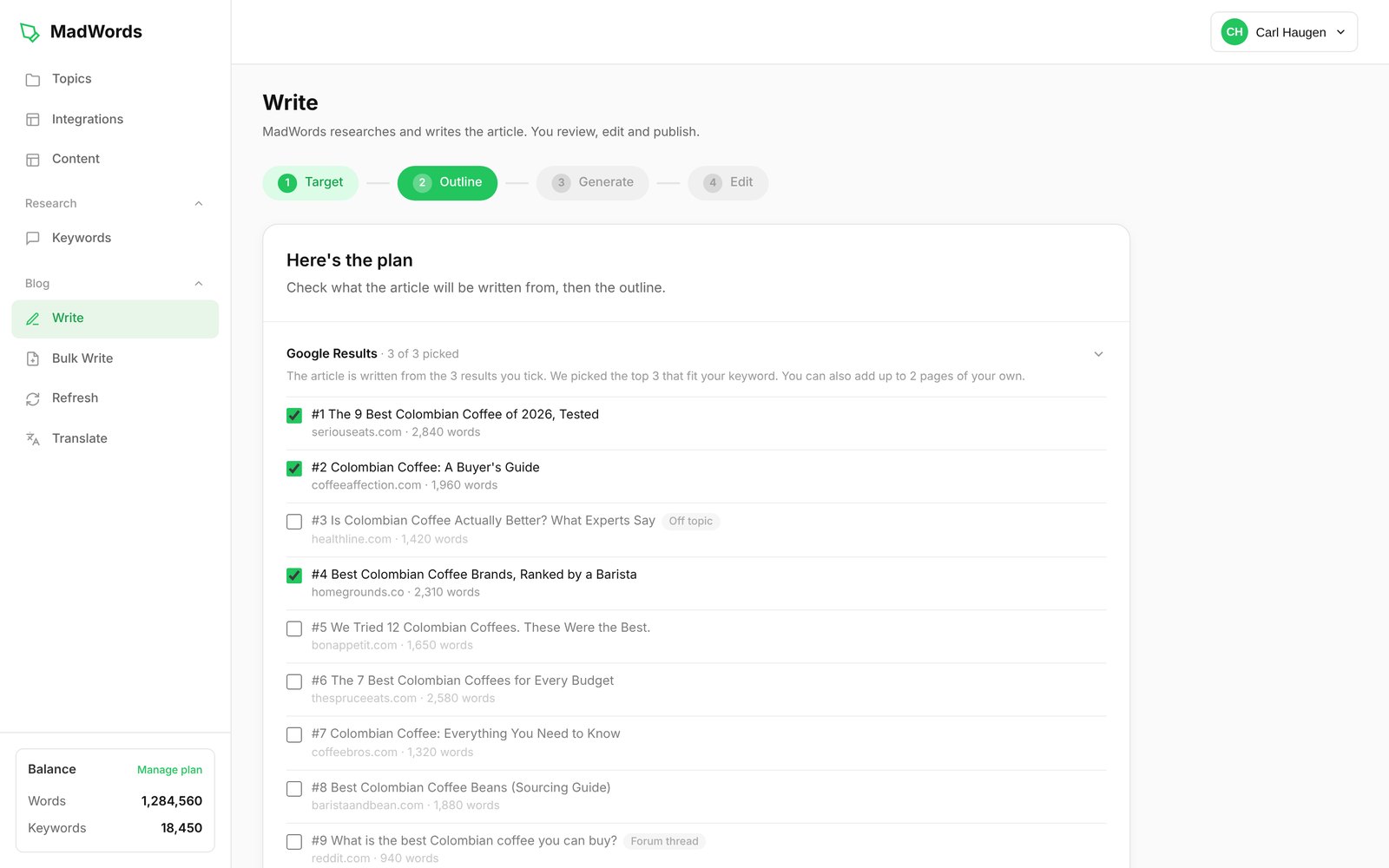
In the example above, MadWords marked a health article as off topic and a Reddit thread as a forum thread, and picked three pages that match what the keyword is asking for. A minute spent here saves editing later.
The Editor
The Editor flips the job around: you write, and MadWords brings the research. Next to your article you get:
- NLP keywords: the words and phrases the top Google results use.
- Entities: the people, places, brands and things those pages talk about.
- Facts from the top results, and the kind of facts AI answers like to quote.
- The Google top results the research came from.
Each keyword and entity turns green once it’s in your article, so you can see what you’ve covered at a glance. There’s no score to chase. The research is there so you know what the pages you’re competing with cover, and you decide what fits.
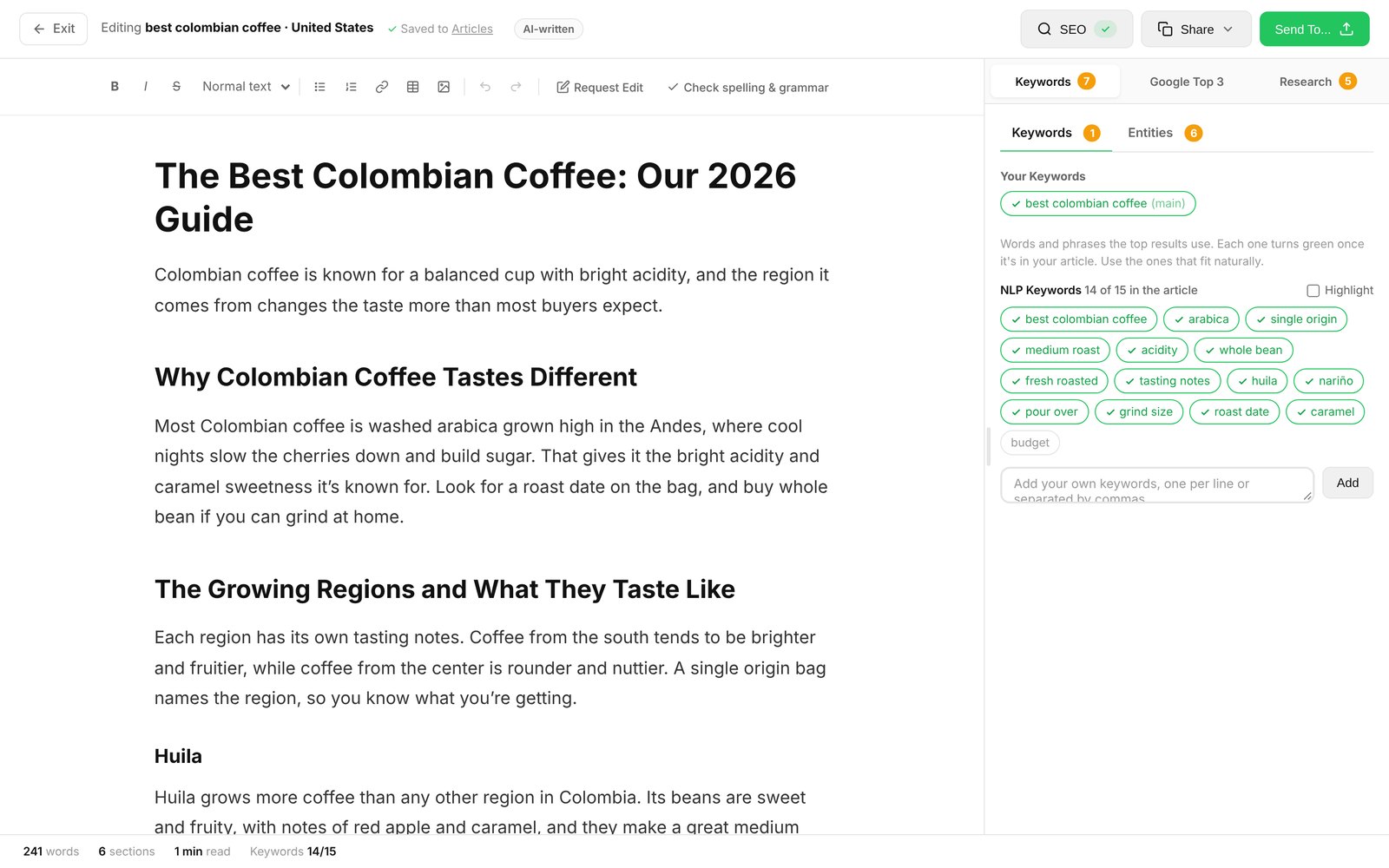
The Editor is also where every article opens when you click Edit on the Content page, with the research it was written from, at no extra cost. MadWords pitches it as a way to write human articles in half the time, and recommends mixing in a human-written article or two for every ten AI articles, or adding a paragraph of your own to each. That’s sensible advice for any AI writer, and it’s good to see a tool say it.
The Editor also has spelling and grammar checks, an outline suggestion from the research, and a Send To button to publish to WordPress or export.
Rewrite
Rewrite works on posts that are already on your WordPress site. You pick the site, browse by category, and choose a post. Then you choose who does the rewrite:
- MadWords rewrites it with fresh research against today’s top results.
- I’ll edit it myself opens the post in the Editor with the same research beside it.
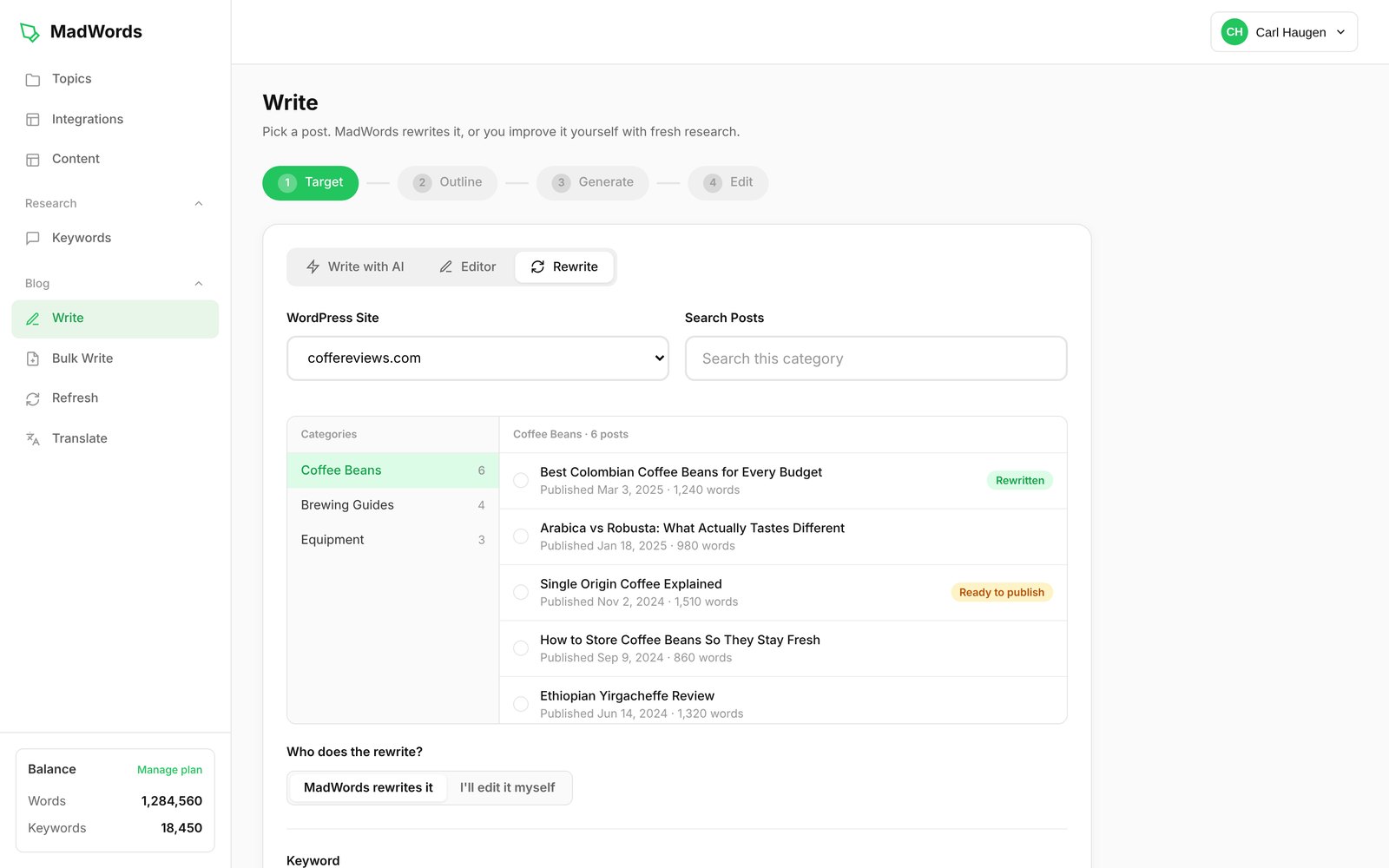
The keyword is filled in from the post’s Yoast or Rank Math focus keyword, or its title if there isn’t one. The post’s images stay where they are, and you can add new ones. Nothing changes on your site until you click Update Post, and it updates the same post at the same URL instead of creating a new one.
The best use is the post stuck on page two. When Search Console shows a page picking up impressions in positions 11 to 20, Rewrite researches the keyword again so the new version covers what the pages above it cover now.
Refresh
Refresh is the set-and-forget feature. It rewrites one paragraph of your published posts on a schedule, so your content keeps getting updated without you touching it.
You pick:
- The Topic and the WordPress category to refresh.
- Which paragraph: the first, the last, or one at random. The rest of the post stays as it is.
- How often: every 1 to 6 months.
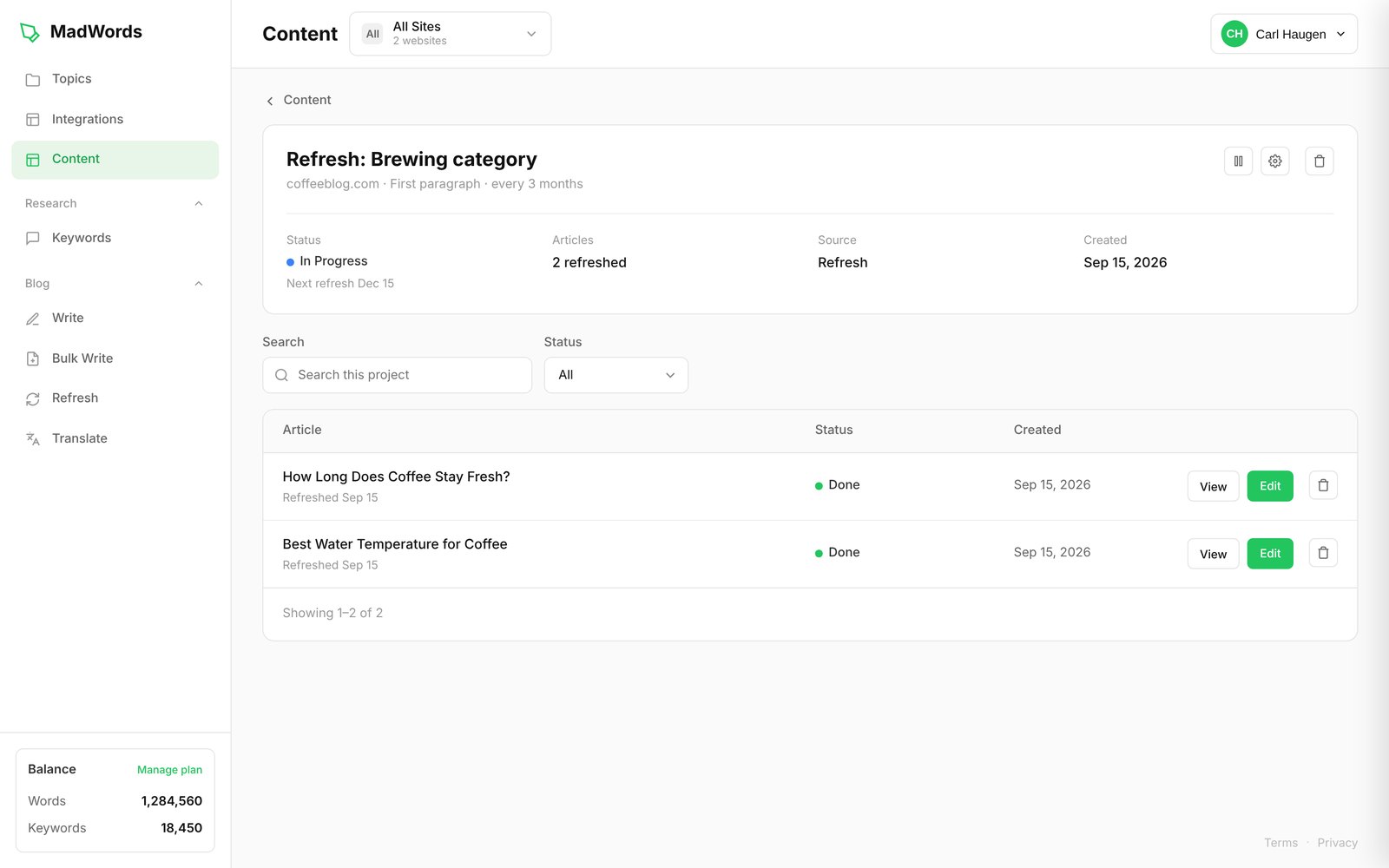
Refreshes go live automatically, with no approval step. If you don’t like one, WordPress keeps the previous revision, so you can roll back. MadWords recommends every 3 months on your core categories.
Refresh and Rewrite do different jobs. Refresh keeps a page current a paragraph at a time. Rewrite is for a page that needs a full update.
Article settings that apply everywhere
Your business, built in
Your Topic stores your business description, product details, selling points and the facts only you know. Every article uses them, so the writing is about your business instead of a generic one, and MadWords doesn’t fill gaps with placeholders like “[Product Name]”.
Include up to 5 products
This one matters for affiliate sites and stores. Name up to 5 products and MadWords researches each one before it writes: specs, prices and ratings from up to 3 retailers, plus what buyers praise and complain about. The first product gets the most coverage, and in a listicle or review the products are ranked in the order you set. You get real specs, prices and buyer reviews instead of guesses.
Article types
Troubleshooting, how-to, review, comparison, listicle, explainer, news and local. Each type is written in the structure that fits it, so a comparison reads like a comparison and a fix-it article gets to the fix.
Custom instructions
Set rules once for a whole campaign: facts, figures, product information, details about your company. Every article in the batch follows them.
Competitor and topic exclusions
Block named competitors, keywords, regions or off-brand topics. If you never want a rival’s name in your articles, it won’t be there.
Smart or set length
Set a minimum and maximum word count, or let MadWords size each article against the top results and its own research. MadWords recommends Auto, because a set length becomes a target: the article pads to reach it or stops before the topic is finished. On Auto, some articles run 900 words and some run 2,500.
SEO title and meta description
Every article gets a title tag and meta description written to best-practice length and structure, with headlines written for click-through.
AI images
Add images in one of 5 styles: Flat Illustration, Photorealistic, Editorial / Painterly, Isometric / Technical and Photographic Lifestyle. Each image costs 200 words. Images don’t include logos or real people, so you don’t have to worry about putting someone’s face or trademark on your page.
Accuracy and fact-checking
MadWords checks every claim against its research before the article is finished, and deletes anything it can’t back up. It doesn’t flag the problem for you to fix later. The claim just isn’t there.
14.5 million article structures, and why there’s no SEO score
This is the biggest difference between MadWords and most AI writers, and it comes down to a Google policy.
In March 2024, Google added scaled content abuse to its spam policies: lots of pages made mainly to manipulate rankings, with unoriginal content that adds little for the reader. How the pages were made isn’t the test. The pattern is. Same section order, same opening, same structure, one keyword swapped. Sites caught by it lost most of their traffic, and some were removed from Google entirely.
Most AI writers produce exactly that pattern without meaning to. One prompt writes every article, so every article comes out the same shape. Settings like tone and reading level are applied to every article you publish, and to every article other customers publish. An SEO score pushes every page toward the same keyword density and formatting.
MadWords goes the other way:
- 14.5 million article structures. Every article is built from a different structure, so no two come out the same. It isn’t random. The variety is in how an article is built, while the article still reads coherently.
- Live research for every article. MadWords reads the current search results seconds before writing, instead of relying on a model’s training data, which stopped on a fixed date and is the same pool of facts every other tool draws from.
- No SEO score and no GEO score. There’s no number to write to.
- No tone or reading level settings, because a setting applied to every article is a template.
One thing MadWords is upfront about: its articles are AI-generated, and AI detectors will say so. Google has said it doesn’t penalize content for being AI. It penalizes scaled and thin content. MadWords is built to avoid those, not to fool a detector.
Built to rank in Google
The features page lists the SEO work done on every article. Here’s what each one means in practice:
- Real-time search data. The research is pulled seconds before writing, so the article is built to beat what’s ranking now.
- Search intent detection. It works out whether a search wants information, a comparison, a purchase or a local answer, and writes to match.
- Featured snippets. Answers are structured as the lists, tables and definitions Google lifts into the top of the results.
- Knowledge graph and entities. The people, places, brands and relationships in the article are defined clearly, so Google and AI engines understand what the page is about.
- E-E-A-T signals. The experience, expertise and trust signals Google’s quality raters look for.
- Information gain. The research looks for facts, figures and sources the top results left out, so the article adds something instead of summarizing the pages above it.
- Headlines built for click-through.
- Local SEO down to the postal code. Target a country, state or province, city, or postal code.
Built to get cited by AI
More searches now end in an AI answer from ChatGPT, Claude, Google AI Overviews and the rest. MadWords formats articles the way those engines quote from:
- Answer-first structure. Direct answers and clean definitions an AI can lift straight into a response.
- Current facts and figures from live research, so there’s something worth citing.
- Entity-rich writing, so the engines know exactly what the article covers.
Translate
Translate takes your WordPress posts or pages and publishes them in other languages, written for Google in each country. It covers 95 languages and 138 countries.
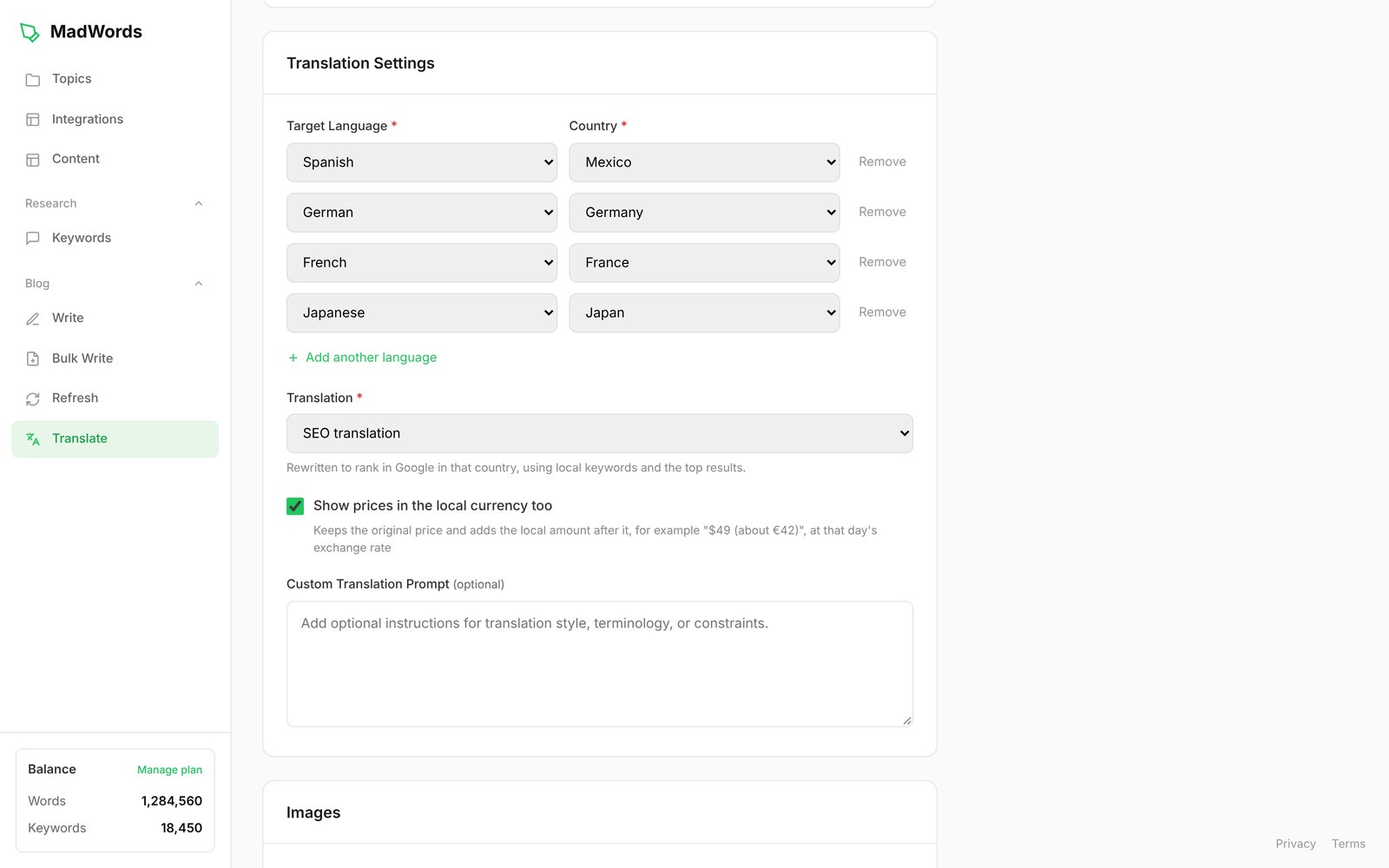
The options:
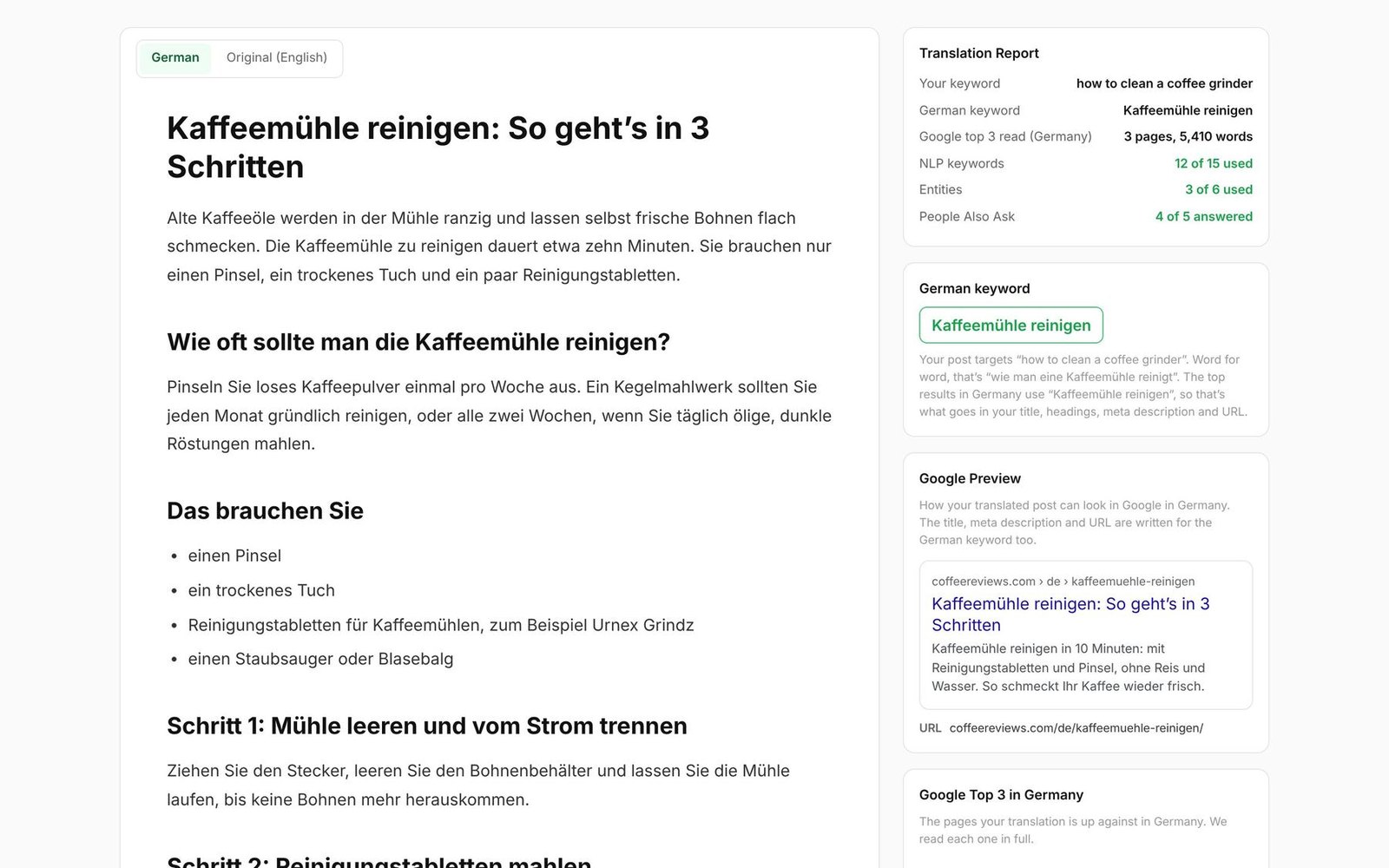
- SEO translation reads the top Google results in the country you pick, finds the keyword people there search with, and rewrites the post to rank there. The title, meta description and URL are in the new language.
- Direct translation stays as close to the original as possible. It’s for sales and landing pages you’ve already got right.
- A language and a country for each. Spanish for Mexico and Spanish for Spain, French for France and French for Canada. Measurements, dates and vocabulary match the country. A shopper in Mexico City searches “computadora,” while one in Madrid searches “ordenador.”
- Prices in the local currency. Prices stay as you wrote them. Turn the option on and the local amount is added after each one, like “$49 (about MX$900).”
- Ongoing or one time. Ongoing keeps translating new posts as you publish them. One time translates what’s there now and stops. You can pick posts or pages, and all categories or only the ones you choose.
- Images in every language. Transfer your post’s images, add new AI images, or both. Images MadWords makes for translations have no text in them, so the same images work in every language, and you pay for them once per post, not once per language. The alt text is translated.
- Free hreflang plugin. The free MadWords WordPress plugin handles hreflang, so Google shows each country its own version of the post. There are no settings to configure.
Each translation comes with a report: the keyword in the new language, the Google top 3 in that country, and a preview of how the post looks in Google there.
Two pieces of advice from MadWords’ own guide are worth repeating. First, translate one page and have someone who speaks the language read it before you translate a thousand, especially outside the most common languages. Second, write in one language and translate, rather than writing the same topic again in Spanish with Bulk Write. Translations are linked to the original for hreflang. Separate articles on the same topic aren’t, and they end up competing with each other.
And if you cancel, your translations stay on your site. They’re regular WordPress posts.
The Content page
Every project lands on one page: Bulk Write batches, single articles, translations and Refresh schedules. You can see what’s in progress and what’s done, read or edit any article, pause a project and change its settings.
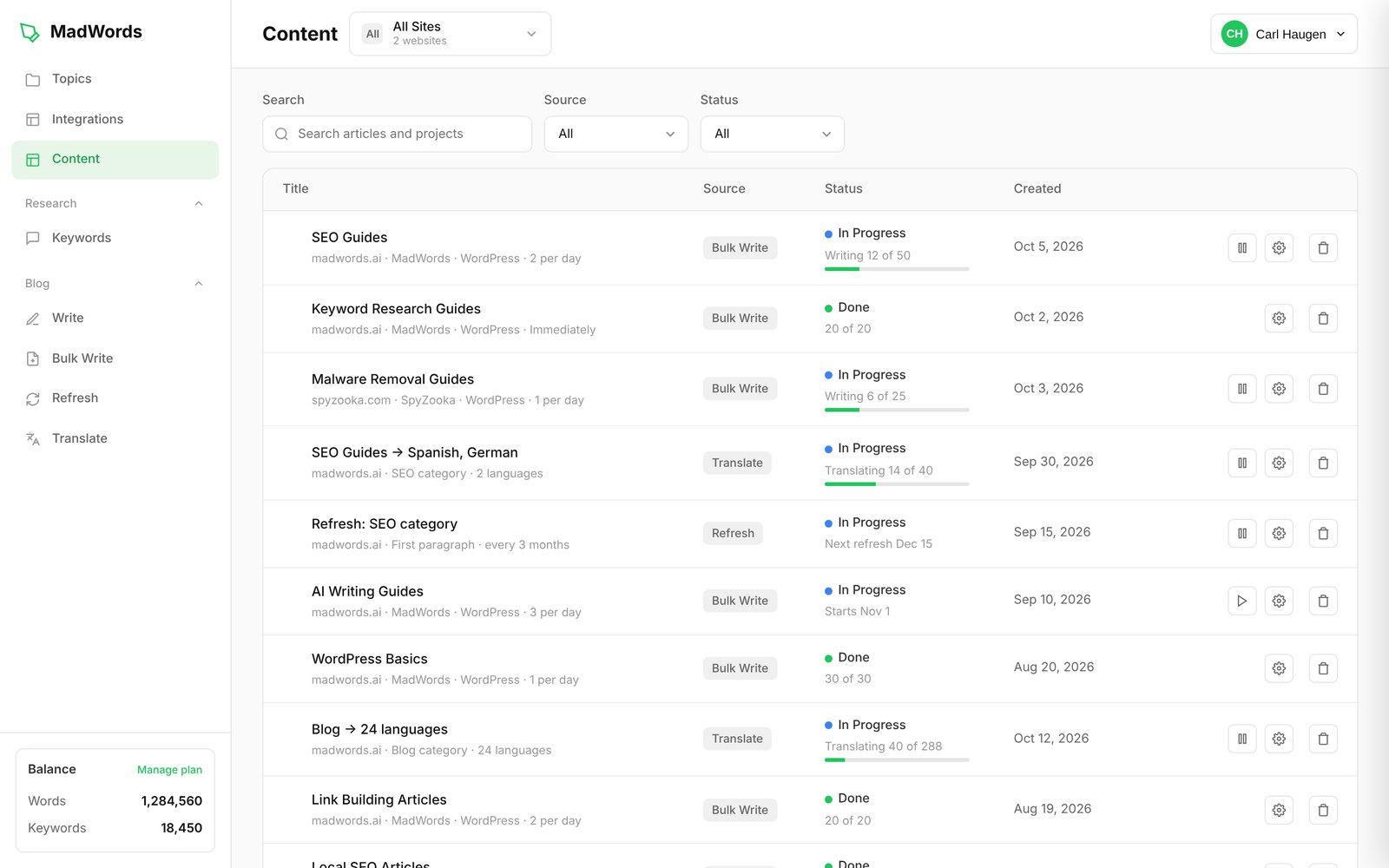
Open an article and you get its report: how many of the top Google pages it was written from, how many NLP keywords and entities it includes, and which information gaps it filled.
Guarantees
No Edit Guarantee
This is the one other AI writers don’t offer. If a MadWords article needs editing, you report it and MadWords credits your account with words equal to the length of the article. What counts:
- A fact, claim, quote, source or statistic that’s wrong
- Bad grammar (style preferences don’t count)
- A bad translation
- Localization that didn’t happen, such as currency, measurements or dates
- Featured or excluded products ignored
- The wrong article type
You email support or use the chat with the article and the problem, and the credit is one per keyword, per account. MadWords says what it learns from each report goes into the product for everyone. It describes the guarantee as “not a promise of perfection,” but a promise that you don’t pay for its mistakes. It applies to free accounts too.
It’s also upfront about where problems are most likely: less common languages, bad data on the web that finds its way into an article, and very small subjects, like a single-location restaurant in a small town, where there isn’t much information to research.
30 day money back
For unused words on your first purchase.
99.99% uptime
Backed by bonus words if MadWords misses it.
Teams, agencies and security
- Unlimited users on every plan, with no per-seat fees.
- Roles. Superadmins have access to everything. Admins can do everything except delete the account. Creators can’t see account or billing pages.
- Multiple sites under one login, kept separate from each other, which suits agencies running client sites.
- Security. SSO, role-based access, encryption and GDPR and CCPA compliance. MadWords says it never sells or shares your content.
- Support. Every question answered within one business day, by chat or at support@madwords.ai.
- A private Discord for paying customers, where the founder is active.
MadWords pricing
Every plan has every feature. They differ in words, keywords and how many websites you can publish to, translate or refresh.
| Plan | Monthly | Yearly | Words | Websites |
|---|---|---|---|---|
| Free | $0 | $0 | 10,000 words and 250 keywords, one time | — |
| Core | $59 | $49 a month ($588 a year) | 50,000 a month, or 600,000 up front on yearly | Up to 2 |
| Pro | $159 | $129 a month ($1,548 a year) | 150,000 a month, or 1,800,000 up front on yearly | Up to 5 |
| Elite | $269 | $219 a month ($2,628 a year) | 300,000 a month, or 3,600,000 up front on yearly | Up to 10 |
| Enterprise | $600 a month per million words | From 12 million a year | Unlimited | |
Yearly plans give you the full year’s words and keywords the day you buy: 6,000 keywords on Core, 24,000 on Pro and 60,000 on Elite.
What words pay for:
- 1 word for each word MadWords writes, rewrites or translates
- 5 words for each extra keyword
- 200 words for each AI image
- Extra words at the same rate as your plan
Words never expire. Unused words roll over for as long as your subscription is active. There are no upsells, no editing service to buy, no feature paywalls and no extra charge for the best AI model. Prices are in US dollars, and checkout offers 130 local currencies.
To put that in articles, here’s what a 2,000-word article costs in words on each yearly plan:
- Core: about $1.96
- Pro: about $1.72
- Elite: about $1.46
- Enterprise: about $1.20
Who MadWords is for
A good fit if you:
- Run one or more WordPress sites and want to publish researched articles on a schedule without editing them.
- Want to build topical authority by covering everything a competitor covers.
- Run an affiliate site or store and need product reviews and roundups with real specs and prices.
- Want to reach other countries with SEO translations instead of word-for-word ones.
- Have old posts slipping in the rankings that need updating.
- Manage several sites or clients and don’t want to pay per seat.
Not a good fit if you:
- Need content that passes AI detectors.
- Want an SEO score to write to, or tone and reading-level settings.
- Need search volume and difficulty data. You’ll want a separate keyword tool for that.
How to get the best results
MadWords’ Quick Start guide is unusually blunt that the article is only half of ranking. Its advice, which applies to any AI writer:
- Put a real author on the page, with a name, photo and short bio.
- Start slow and increase slowly.
- Your site needs some authority: backlinks, some age and real pages.
- Build topical authority by covering a subject more completely than anyone else.
- Keep some of it human. Write some posts yourself, or add your own paragraphs to MadWords articles.
Frequently asked questions
Is every feature really on every plan?
Yes. Plans differ only in words, keywords and the number of websites: up to 2, 5, 10 or unlimited.
Do I need WordPress?
Not to write. Choose MadWords Only and your articles are saved in your account, where you can edit and export them. Translate, Refresh and Rewrite work on WordPress posts, so they need WordPress.
Will Google penalize AI content from MadWords?
Google penalizes scaled content, meaning lots of pages built from the same template that add nothing new, not content for being AI. MadWords writes every article from live research with a different structure each time. Nobody can promise rankings, and MadWords doesn’t.
Do the articles pass AI detectors?
No, and MadWords says so on its own site.
Which AI model does it use?
MadWords says it always uses the best available model and doesn’t charge extra for it. Every word costs the same.
What happens if an article has a mistake?
Report it under the No Edit Guarantee and you’re credited with words equal to the article’s length.
Can my whole team use it?
Yes. Unlimited users on every plan, with roles and SSO.
Is there a free trial?
There’s a free plan with 10,000 words and 250 keywords, and no credit card. That’s enough for several full articles.
Our verdict
MadWords is built around a clear idea: AI content is fine with Google, scaled content isn’t, and the way to avoid it is live research and a different structure for every article, with no score or template pulling everything into one shape. Around that it adds the jobs a content site actually needs: finding keywords from competitors, writing in bulk on a schedule, writing by hand with research beside you, rewriting and refreshing old posts, and translating for other countries.
The pricing is simple, words don’t expire, and every feature is on every plan. The No Edit Guarantee goes further than any other AI writer we’ve compared it with.
The gaps are real too: no search volume data, Translate, Refresh and Rewrite need WordPress, translation quality drops outside the most common languages, and the product is new. The free plan is the easiest way to find out whether the articles are good enough for your site. Write a few, read them, and decide whether you’d put your name on them.
Get 10,000 free words from MadWords. No credit card required.
Feature by feature
|
|
|
|
|
|
|---|---|---|---|---|---|
| Bulk writing | |||||
| Bulk Write from Keywords | ✓ | ✓ | ✓ | ✕ | ✕ |
| Bulk Write from RSS Feeds | ✓ | ✕ | ✕ | ✕ | ✓ |
| Article quality | |||||
| NLP Keywords | ✓ | ✓ | ✓ | ✕ | ✓ |
| Entities | ✓ | ✓ | ✓ | ✓ | ✓ |
| Information Gain | ✓ | ✕ | ✕ | ✕ | ✕ |
| People Also Ask | ✓ | ✓ | ✕ | ✓ | ✕ |
| Research Before Writing | ✓ | ✓ | ✓ | ✓ | ✓ |
| Images | ✓ | ✓ | ✓ | ✓ | ✓ |
| Infographics | ✓ | ✕ | ✕ | ✓ | ✓ |
| Include Products | ✓ | ✓ | ✓ | ✕ | ✓ |
| Exclude Products | ✓ | ✓ | ✕ | ✕ | ✕ |
| Avoids Scaled-Content Patterns | ✓ | ✕ | ✕ | ✕ | ✕ |
| Editing and updates | |||||
| Rewrites Existing Posts | ✓ | ✓ | ✓ | ✓ | ✓ |
| Manual Editor with SEO Data | ✓ | ✓ | ✓ | ✓ | ✕ |
| Scheduled Post Refresh | ✓ | ✕ | ✕ | ✕ | ✕ |
| Translation | |||||
| SEO-Based Translation | ✓ | ✕ | ✕ | ✓ | ✕ |
| Direct Translation | ✓ | ✕ | ✕ | ✕ | ✕ |
| Research and publishing | |||||
| Competitor Keyword Research | ✓ | ✓ | ✓ | ✕ | ✕ |
| WordPress Integration | ✓ | ✓ | ✓ | ✓ | ✓ |
| Plans and guarantees | |||||
| Words Never Expire | ✓ | ✕ | ✕ | ✕ | ✓ |
| Up-Front Pricing | ✓ | ✕ | ✕ | ✕ | ✕ |
| Latest AI Models Included | ✓ | ✕ | ✕ | ✕ | ✕ |
| Uptime Guarantee | ✓ | ✕ | ✕ | ✕ | ✕ |
| Unlimited Users | ✓ | ✕ | ✕ | ✕ | ✕ |
| Role-Based Permissions | ✓ | ✓ | ✕ | ✓ | ✕ |
| No-Edit Guarantee | ✓ | ✕ | ✕ | ✕ | ✕ |
| Money-Back Guarantee | ✓ | ✓ | ✓ | ✕ | ✕ |
| Money-back guarantee | 30 days | 7 days | 15 days | None | — |
| Paid version | $49/mo (billed yearly) | $49/mo (billed yearly) | $25/mo | $39/mo (billed yearly) | $19/mo |
| Visit MadWords | Visit Surfer | Visit Koala | Visit Frase | Visit Autoblogging.ai | |

Scan & Repair Your PC For Free
Junk files, registry issues, spyware & tracking cookies are making your computer sluggish.
Free DownloadWorks on Windows 7, 8, 10 and 11

Carl Haugen
Carl Haugen is the founder of ZookaWare LLC, the company behind Cyberlab, SpyZooka and MadWords. He has been building software since 2004 and has worked in Windows security, PC repair software and SEO for more than 20 years. At Cyberlab he writes about PC security, privacy and the software people use to protect and speed up their computers.